Useful CRM Tips

Useful CRM Tips...
Showing posts with label CRM 4.0 (JavaScript). Show all posts

Thursday, October 06, 2011

Sort Option Set (Picklist) on the CRM Form


/* Code to Sort Option List */

function sortList() {
    var lb = document.getElementById("fslr_custompicklist");
    arrTexts = new Array();
    arrValues = new Array();
    arrID = new Array();
    var len = lb.length;
    for (i = 0; i < len; i++) {
        arrTexts[i] = lb.options[i].text;
        arrValues[i] = lb.options[i].value;
        arrID[i] = lb.options[i].text;
    }
    arrID.sort();

    for (i = 0; i < lb.length; i++) {
        lb.options[i].text = arrID[i];
        for (j = 0; j < arrValues.length; j++) {
            if (arrTexts[j] == arrID[i]) {
                lb.options[i].value = arrValues[j];
                break;
            }
        }
    }
}

Display Loading Panel on Popup Loading

/* Code to Display Loading Panel for Popup Window */

crmForm.all.tab1Tab.onclick = function () {
    var iframe = document.getElementById("IFRAME_QueryXML");
    iframe.style.display = 'none';

    var AddedDiv = document.getElementById("MyDiv");
    if (AddedDiv == null) {
        var NewDiv = document.createElement("div");
        NewDiv.id = "MyDiv";
        NewDiv.style.position = "relative";
        NewDiv.style.left = "50%";
        NewDiv.style.top = "50%";
        var img = document.createElement("IMG");
        img.src = "/../ISV/Survey/Images/Progress.gif";
        NewDiv.appendChild(img);
        iframe.parentNode.appendChild(NewDiv);
    }
    crmForm.all.IFRAME_QueryXML.src = crmForm.all.IFRAME_QueryXML.src;
    iframe.onreadystatechange = function () {
        if (iframe.readyState == "complete") {
            document.getElementById("MyDiv").style.display = 'none';
            document.getElementById("IFRAME_QueryXML").style.display = 'inline';

        }
    }
}

Display a popup on crm form

/* Code to Display A Popup from CRM FORM */

var divid = document.getElementById("NewDiv");
if (divid == null) {
    var NewDivs = document.createElement('div'); NewDivs.id = "NewDiv"; NewDivs.innerHTML = "<div id='divCompanyInfo' align='center' style='width: 85%; height:auto;display:none; position: absolute; top:15%; left:10%; z-index: 10000;'>"
+ "<table border='0' bgcolor='#55729c' cellspacing='0' cellpadding='1' width='100%'>"
+ "<tr>"
+ "<td width='100%'>"
   + "<table border='0' cellpadding='0' cellspacing='0' width='100%'>"
        + "<tr>"
            + "<td style='cursor: pointer; font-size: 12px; font-weight: bold; background-color: #a4c0e7;' width='100%'>"
                + "<ilayer onselectstart='return false' width='100%'>"
       + "<layer width='100%'>"
    + "<div color='black' style='padding-left:10px;  height:25px; padding-top:5px;' face='Verdana'><div id = 'titleDiv'><div style='float:left; width:80%'>Address</div><div id= 'closediv' style='float:right; position:relative; right:3px; top:-3px; font-weight:bold; font-size:13px; background-color:#ffffff; padding:1px 3px 1px 3px; border:#666666 solid 1px; color:#666666;' >X</div></div></div></layer>"
   + "</ilayer>"
            + "</td>"
        + "</tr>"
        + "<tr>"
            + "<td bgcolor='#FFFFFF' colspan='2' width='100%'>"
                + "<div>"
                    + "<iframe id='frame_ViewComp' runat='server' frameborder='0' src='' style='width:100%;'></iframe>"
                + "</div>"
            + "</td>"
        + "</tr>"
        + "<tr>"
        + "<td>"
        + "<div style='background-color: #a4c0e7; height: 31px; text-align: right; border-top: #5771a2 silid 5px; padding: 5px 10px 0px 10px;'>"
            + "<div>"
            + "<asp:Button runat='server' ID='btncls' CssClass='crmbuttonLarge' style='float:left;' Width='120px' Text='Run Actions ' OnClientClick = 'CallIframe(); return false;' /></div>"
            + "<div id='footercloseDiv' style='width: 100px;'>"
            + "</div>"
        + "</div>"
        + "</td>"
        + "</tr>"
    + "</table>"
+ "</td>"
+ "</tr>"
+ "</table>"
+ "</div>";

    document.getElementById("tab0").appendChild(NewDivs);
    document.getElementById("closediv").onclick = function () { document.getElementById('divCompanyInfo').style.display = 'none'; };
}

   Use the below Code on CRM form Load Event to Create a Custom Button on the 
   CRMform:

  /* Code  to Create a Button on CRM FORM */

/* Convert TextBox to Button */
function create_button_from_textattribute(fieldname, buttontext, buttonwidth, clickevent) {
    functiontocall = clickevent;
    crmForm.all[fieldname].DataValue = buttontext;
    crmForm.all[fieldname].style.borderRight = "#3366cc 1px solid";
    crmForm.all[fieldname].style.paddingRight = "5px";
    crmForm.all[fieldname].style.borderTop = "#3366cc 1px solid";
    crmForm.all[fieldname].style.paddingLeft = "5px";
    crmForm.all[fieldname].style.fontSize = "11px";
    crmForm.all[fieldname].style.backgroundImage = "url(/_imgs/btn_rest.gif)";
    crmForm.all[fieldname].style.borderLeft = "#3366cc 1px solid";
    crmForm.all[fieldname].style.width = buttonwidth;
    crmForm.all[fieldname].style.cursor = "pointer";
    crmForm.all[fieldname].style.lineHeight = "14px";
    crmForm.all[fieldname].style.borderBottom = "#3366cc 1px solid";
    crmForm.all[fieldname].style.backgroundRepeat = "repeat-x";
    crmForm.all[fieldname].style.fontFamily = "Tahoma";
    crmForm.all[fieldname].style.height = "20px";
    crmForm.all[fieldname].style.backgroundColor = "#cee7ff";
    crmForm.all[fieldname].style.textAlign = "center";
    crmForm.all[fieldname].style.overflow = "hidden";
    crmForm.all[fieldname].attachEvent("onmousedown", push_button);
    crmForm.all[fieldname].attachEvent("onmouseup", release_button);
    crmForm.all[fieldname].attachEvent("onclick", functiontocall);
    crmForm.all[fieldname + '_c'].style.visibility = 'hidden';
}


function push_button() {
    window.event.srcElement.style.borderWidth = "2px";
    window.event.srcElement.style.borderStyle = "groove ridge ridge groove";
    window.event.srcElement.style.borderColor = "#3366cc #4080f0 #4080f0 #3366cc";
}

function release_button() {
    window.event.srcElement.style.border = "1px solid #3366cc";
}


/* tell the button what to do */
function Savetheform() {
    /* the function */
    document.getElementById('frame_ViewComp').src = "/isv/PostalCodeAddress/HTMLPage.htm";
    document.getElementById('divCompanyInfo').style.display = 'block';
}

create_button_from_textattribute('aa_addressbutton', 'Get Address', '100px', Savetheform);

Hide Left nav pane in Entity form

/* Code to Hide a Link in Left navigation Pane of a Entity */

var loadArea2 =  loadArea;

loadArea = function(area)
{
    loadArea2(area);
    if (area == 'fslr_fslr_survey_fslr_questionactionquery')
    {
        var iframe =
document.getElementById('fslr_fslr_survey_fslr_questionactionqueryFrame');

         iframe.onreadystatechange = function()
        {
            if (iframe.readyState == 'complete') {

document.frames['fslr_fslr_survey_fslr_questionactionqueryFrame'].document.getElementById('_MBtoplocAssocOneToMany10006fslrfslrsurveyfslrquestionactionquery').style.display = 'none';
            }

        }
    }
}

Call a On Demand Workflow with Javascript using Soap Call


/* Function to call an On Demand WorkFlow on a Button Click */

callworkflow = function () {
    crmForm.SaveAndClose();
    try {
        var PhoneCallId = crmForm.ObjectId;
        var authenticationHeader = GenerateAuthenticationHeader();
        //Prepare the SOAP message.
        var xml = '<?xml version="1.0" encoding="utf-8"?>' +
'<soap:Envelope xmlns:soap="
http://schemas.xmlsoap.org/soap/envelope/"' +
' xmlns:xsi="
http://www.w3.org/2001/XMLSchema-instance"' +
' xmlns:xsd="
http://www.w3.org/2001/XMLSchema">' +
authenticationHeader +
'<soap:Body>' +
'<Execute xmlns="
http://schemas.microsoft.com/crm/2007/WebServices">' +
'<Request xsi:type="ExecuteWorkflowRequest">' +
'<EntityId>' + PhoneCallId + '</EntityId>' +
'<WorkflowId>17E32F08-5D51-460E-B5A6-67AAEED92F20</WorkflowId>' +
'</Request>' +
'</Execute>' +
'</soap:Body>' +
'</soap:Envelope>'
        var xHReq = new ActiveXObject('Msxml2.XMLHTTP');
        xHReq.Open('POST', '/mscrmservices/2007/CrmService.asmx', false);
        xHReq.setRequestHeader('SOAPAction', 'http://schemas.microsoft.com/crm/2007/WebServices/Execute');
        xHReq.setRequestHeader('Content-Type', 'text/xml; charset=utf-8');
        xHReq.setRequestHeader('Content-Length', xml.length);
        xHReq.send(xml);

        var resultXml = xHReq.responseXML;
        if (resultXml) {
            return resultXml.selectSingleNode("//Response/Id").nodeTypedValue;
        }
        crmForm.ui.Close();
    }
    catch (e) {
        alert("Failed to Execute");
    }
    return null;
}

Alert User on Abnormal Close of CRM form Window


The Below Code will Popup the alert when you close the form without saving the changes made in that.

/* Code to Alert User On Abrupt Close of a Window */

window.onbeforeunload =
function () {
    if (document.getElementById("IFRAME_QueryXML").contentWindow.window.ispagedirty) {
        event.returnValue = "Changes made to Conditions will be lost!";
        return false;
    }
};

Adding a Menu List to CRM Form

We can add completly a New Custom Menu to the CRM form using the below code:

We need to place the below code on form load event of the CRM form.

/* Code to Add Menu to CRM FORM */

if (document.getElementById("_MBCustomActionMenu") == null) {
    /* Create an Span Link to Menu */
    var eles = "<SPAN class='ms-crm-Menu-Label-Opened'><A class='ms-crm-Menu-Label' tabIndex='-1'><IMG class='ms-crm-Menu-ButtonFirst' tabIndex='-1' alt='CustomActions' src='/_imgs/mnu_actions.gif'><SPAN class='ms-crm-MenuItem-Text' tabIndex='0'><U>C</U>ustomActions</SPAN><IMG style='CLIP: rect(0px 11px 16px 0px); BACKGROUND-IMAGE: url(/_imgs/imagestrips/control_imgs_1.gif); WIDTH: 11px; BACKGROUND-POSITION-Y: -32px; HEIGHT: 16px' id='IMG1' class='ms-crm-Menu-DownArrow' alt='More' src='/_imgs/imagestrips/transparent_spacer.gif'></A><A class='atLink' title='Open the Accessible form of the Actions menu' tabIndex='-1' onclick='return false;' href='javascript:onclick();' target='_self'></A></SPAN>";
    /* Create the Menu Items */
    eles += "<div style='display: none;'><ul class='ms-crm-MenuList' id='mnuaction'>";
    for (i = 0; i < 5; i++) {
      eles += "<li tabIndex='-1' class='ms-crm-MenuItem-Label' id='_MIlocAddObjTo"+i+"' action='locAddObjTo("+i+");'><SPAN class='ms-crm-MenuItem-Label'><A class='ms-crm-MenuLink' tabIndex='-1' onclick='return false;' href='javascript:onclick();' target='_self'><SPAN class='ms-crm-MenuItem-Icon'></SPAN><SPAN class='ms-crm-MenuItem-Text' tabIndex='0'>Test Action "+i+"...</SPAN></A></SPAN></li>";
  }
  eles += "</ul></div>";

    var mnu = document.createElement("li");
    mnu.className = "ms-crm-Menu";
    mnu.title = "Custom Actions";
    mnu.tabIndex = -1;
    mnu.accessKey = "C";
    mnu.menu = "mnucustomactions";
    mnu.innerHTML = eles;

    var ele = document.getElementsByTagName("ul");
    for (i = 0; i < ele.length; i++) {
        if (ele[i].className == "ms-crm-MenuBar-Left") {
            ele[i].appendChild(mnu);
            break;
        }
    }
}

Add a menu item to action menu on CRM FORM


    With the below code you can achieve the above functionality: 


/* Code to add a Button in Action Menu List of a CRM FORM */

/* Code to call a js function on item click */function TestAction() {
    alert("Hi..");
}
if (document.getElementById("_MBTestAction") == null) {
    var elem = document.getElementById("mnuaction");
    var newEle = document.createElement("li");
    newEle.id = "_MBTestAction";
    newEle.className = "ms-crm-MenuItem-Label";
    newEle.tabIndex = -1;
    newEle.action = "TestActionTest();";
    newEle.innerHTML =
"<SPAN class='ms-crm-MenuItem-Label'><A class='ms-crm-MenuLink' tabIndex='-1' onclick='return false;' href='javascript:onclick();' target='_self'><SPAN class='ms-crm-MenuItem-Icon'></SPAN><SPAN class='ms-crm-MenuItem-Text' tabIndex='0'>Do Test Action...</SPAN></A></SPAN>";
    elem.appendChild(newEle);
}
/* Code to add function to the Event Called from Button */
TestActionTest = TestAction;


Add a Button On Top of a CRM FORM


        You will achieve the above result with the below js customization:

You need to place below java script on the load event of the form.


/* Code to add a button dynamically on top of a CRM form */

if (document.getElementById('_MBcrmGridAddBidders') == null) {
    var li = document.createElement("li");
    li.id = "_MBcrmGridAddBidders";
    li.className = "ms-crm-Menu";
    li.title = "Add Bidders";
    li.tabIndex = -1;
    li.onclick = function () { Execute(); }
    li.innerHTML = "<SPAN class='ms-crm-Menu-Label'>" +
"<IMG class=ms-crm-Menu-ButtonFirst tabIndex=-1 alt='AddBidders' src='/Crestwood/_Common/icon.aspx?objectTypeCode=10001&iconType=DBGridIcon&inProduction=1&cache=1'>" +
"<SPAN class=ms-crm-MenuItem-TextRTL tabIndex=0>Add Bidders</SPAN>" +
"</A>" +
"</SPAN>";
    var ele = document.getElementsByTagName("ul");
    for (i = 0; i < ele.length; i++) {
        if (ele[i].className == "ms-crm-MenuBar-Left") {
            ele[i].appendChild(li);
            break;
        }
    }
}

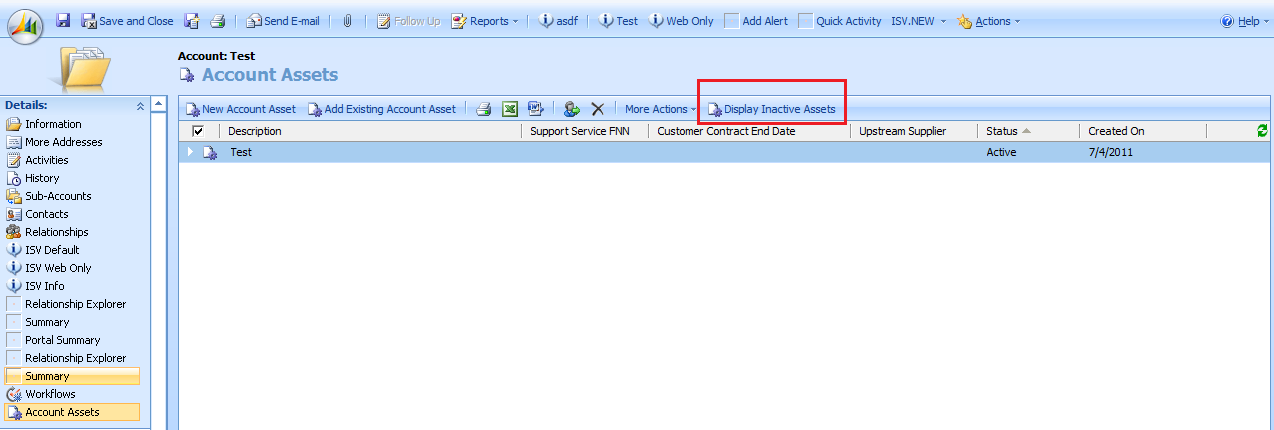
Add a Button Dynamically to Associated Grid


     You can achieve the above output, when you do below Customization:

     /* Code To Add a Button to form Associated View Grid */

/* function call on click of the dynamically Created Button */
function AlertMe() {
    alert("Hi...");
}

/* Code Responsible to achieve the above requirement */
var loadArea2 = loadArea;
loadArea = function (area) {
    loadArea2(area);
    if (area == "new_account_new_accountasset") {
        document.getElementById("new_account_new_accountassetFrame").src = document.getElementById("new_account_new_accountassetFrame").src;
        var iframe = document.getElementById("new_account_new_accountassetFrame");
        iframe.onreadystatechange = function () {
            if (iframe.readyState == 'complete') {
                if (iframe.contentWindow.window.document.getElementById('MBcrmGridDisplayInactive') == null) {
                    var li = document.createElement("li");
                    li.id = "_MBcrmGridDisplayInactive";
                    li.className = "ms-crm-Menu";
                    li.title = "Display Inactive";
                    li.tabIndex = -1;
                    li.onclick = function () { AlertMe(); }
                    li.innerHTML = "<SPAN class='ms-crm-Menu-Label'>" +
"<IMG class=ms-crm-Menu-ButtonFirst tabIndex=-1 alt='DisplayInactiveAssets' src='/ITSolutions/_Common/icon.aspx?objectTypeCode=10000&iconType=GridIcon&inProduction=1&cache=1'>" +
"<SPAN id='titlespan' class=ms-crm-MenuItem-TextRTL tabIndex=0>Display Inactive Assets</SPAN>" +
"</A>" +
"</SPAN>";
                    var ele = iframe.contentWindow.window.document.getElementsByTagName("ul");
                    for (i = 0; i < ele.length; i++) {
                        if (ele[i].className == "ms-crm-MenuBar-Left") {
                            ele[i].appendChild(li);
                            break;
                        }
                    }
                }
            }
        }
    }
}